How to stop pen drive or flash drive virus when inserted to computer,how to avoid USB device virus-All answered
If auto play is enabled in your system then when you insert a pen drive or usb device , media (audio,video) and setup files in the device start immediately.This option is now-a-days is used to spread virus or harmful program from infected pen drive to computers.
It is a most severe problem.Whenever a pen drive is infected ,you can not insert in to ps to clean it.As you insert it to clean,it will infect your pc and you will never know it.
Turn off auto play-Can easily be done.
Open "Group policy editor"
- In start menu open run option.
- In the text input area of "run" type gpedit.msc .
- Then press "ok " button.
- Thus "Group policy Editor " will open.
- start-run-(gpedit.msc)-ok
Work with "Group policy editor"
- In group policy editor , click on Administrative templates in user configuration .
- (group policy editor -user configuration-Administrative template).
Turn off auto play- finally.
In administrative template under user configuration ,click on "system".Then click "turn off auto play" .
Check the radio button in "Enabled" and select "all drives" .Thus the turn off option is enabled.
Useful links-Flash drive security
How to format virus infected pen drive / flash drive / memory card safely.
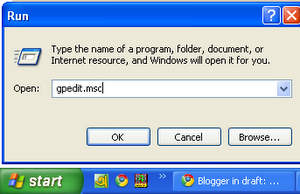 |
| Type "gpedit.msc" and press ok |
 |
| Work with group policy editor |
 |
| Find "turn off autoplay" |
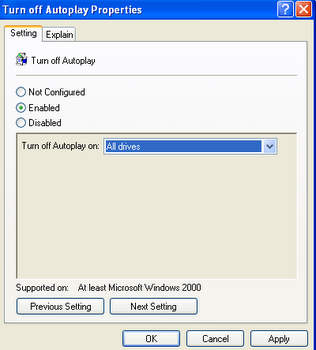 |
| Enable "turn off autoplay" |